
Google Ads management means we set up, manage and evaluate your advertising on Google so that it brings enquiries and sales, not just clicks. Digitalman is a Google Ads agency from Bratislava and has been a certified Google Partner for 6 years. The campaigns we manage have a combined budget of €40,000 to €50,000 per month. Our Google Ads specialists manage Search, Shopping, Performance Max and YouTube campaigns.
- Ad budget: paid directly to Google
- First consultation: 60 minutes free, online via Teams or Google Meet
- Free audit: Google Ads and GA4 tracking review within 5 working days
- Campaign types: all that Google Ads offers
- On every account: PPC specialist and PPC strategist
Book a free 60 minute consultation →
Who is Google Ads management for?
| Business type | Our focus | Key metric |
|---|---|---|
| Online shops | Shopping and Performance Max, product profitability | ROAS and cost of sale |
| B2B companies and service providers | Search campaigns, qualified enquiries and calls | Cost per enquiry (CPA) |
| Local businesses | Local searches and linking with the Google Business Profile | Calls and visits |
Google Ads is not for everyone. If people are not yet searching for your service or product, for example in a brand new category, social media advertising often helps more. In the first consultation we will tell you honestly whether Google advertising makes sense for you.
What does the initial setup include?
We do the initial setup once, at the start of our work together. For an existing account we start with an audit.
- Tracking: Setup or audit of Google Analytics 4, linking with Google Ads, conversion tracking and importing goals from GA4 into Google Ads.
- Search campaigns: Campaign structure following the logic of your website, ad copy from our copywriter and negative keywords that save budget.
- Performance Max: Copy, graphic formats and audience definition.
- Remarketing: Tracking tags on the website and audiences of people who have already visited your website.
What does monthly Google Ads management include?
- Search campaigns: Work with keywords and negative keywords, new ad copy, bid adjustments for individual product groups and A/B tests.
- Performance Max: A/B tests of bid strategies, copy and targeting, and checking the search terms your ads appear for.
- Remarketing: Optimisation of placements and bid strategy.
- New opportunities: When we see potential, we suggest a new campaign type or new targeting.
- Monthly report: how much you spent, how many enquiries or sales it brought and what we will change next.
How do we evaluate results?
| Business type | What we measure |
|---|---|
| Online shop | Revenue from advertising, ROAS and cost of sale, i.e. how much revenue each euro, pound or dollar of advertising brings |
| B2B companies and service providers | Number of enquiries and calls and the cost per enquiry |
| Local business | Calls, direction requests and form enquiries |
In the monthly report you see these numbers in your currency, the comparison with the previous period and specific steps we propose for the next month.
How we work together
- Free consultation: We discuss your goals, budget and current situation.
- Audit and proposal: We prepare a campaign structure and a budget estimate.
- Initial setup: Conversion tracking, campaigns, ads and exclusions. For a new account we activate Google’s welcome credit.
- Optimisation and report: We optimise campaigns continuously and evaluate results once a month in your currency.
What do we need from you at the start?
- Access to Google Ads, Google Analytics 4 and Google Tag Manager, if you have them. If not, we create the accounts in your name.
- Your business goals: which enquiries or sales you want to win and what a customer is worth to you.
- Information about products, margins and seasonality, so the budget goes where it makes money.
- A contact person who approves ad copy and gives us feedback on the quality of enquiries.
Is another agency running your campaigns? The handover happens without pausing campaigns and your accounts stay yours. See how switching your marketing agency works, or start with a free Google Ads audit.
Who manages your campaigns?
Two people work on every account. The PPC specialist handles the day to day work and technical settings. The PPC strategist plans the strategy, budgets and direction of the campaigns.
All campaigns are overseen by Digitalman founder Ing. Matej Tóth. He has worked in online marketing for more than 15 years, previously in marketing at ČSOB, Orange and CEWE.
Why choose Digitalman as your Google Ads agency?
- Google Partner for 6 years. Google Partner status is awarded to agencies that meet Google’s requirements for performance, managed spend and certifications.
- Two people on every account instead of one person doing everything.
- Experience from 8 markets and more than 110 clients: Slovakia, Czech Republic, Germany, Austria, United Kingdom, Spain, USA and Middle East.
- Results in your currency, not in clicks.
- Expert in the media: Appearances on Slovak television (TV Markíza and RTVS), podcasts and webinars on online marketing.
Google Ads agency, consultant or in-house specialist?
| Digitalman agency | Freelancer | In-house PPC specialist | |
|---|---|---|---|
| Monthly cost | individual quote | by agreement | full time salary and payroll costs |
| People on the account | two (specialist and strategist) | one | one |
| Cover during holidays or illness | yes | limited | no |
| Experience from other industries and markets | more than 110 clients and 8 markets | depends on experience | only your company |
| Google Partner status and welcome credit | yes | depends on the person | no |
An in-house specialist pays off with very large budgets and many campaigns. For most small and medium sized companies an agency is cheaper and provides cover.
Approach by industry
We adapt campaigns and content to your industry. See how we work for these industries, for example:
Frequently asked questions
How much does Google Ads management cost?
The cost depends on the scope: number of campaigns, products and countries. Our fee is not tied to the size of the ad budget, so we have no reason to push you to spend more. We prepare an exact quote after the free consultation.
When will I see results?
First clicks and enquiries come right after launch. For meaningful data and optimisation allow 2 to 3 months. After about six months the campaigns should deliver the expected results.
Do I need a minimum budget?
Google does not require a minimum deposit, and you set the daily budget yourself. You never pay more than the limit. With a budget that is too small, however, campaigns often collect too little data for reliable optimisation. We recommend the right amount based on competition in your industry.
Will I get welcome credit from Google?
Yes, if you open a new Google Ads account. As a Google Partner we can secure a one-off welcome credit for you. The amount depends on the country and your spend in the first 60 days. We explain the conditions in the first consultation.
Which campaign types do you manage?
All that Google Ads offers: Search, Performance Max, Shopping, Demand Gen, Display, YouTube video campaigns, App campaigns and Smart campaigns, depending on what makes sense for your business.
Who manages my campaigns?
Two people work on every account: a PPC specialist for the day to day work and technical settings, and a PPC strategist who plans strategy and budgets. Digitalman is a certified Google Partner with 15 years of experience from campaigns in many countries.
Do you manage Google Ads for businesses in the UK and the US?
Yes. We have run campaigns for the UK, the USA, Germany, Austria, Spain and the Middle East. We work remotely, communicate in English and report in the currency of your ad account. Bratislava is one hour ahead of London, so our working day fully overlaps with UK business hours and with the morning on the US East Coast. We also manage Google Shopping and Performance Max campaigns for online shops.
Want to know what Google advertising would bring your business? Book a free 60 minute consultation →
If you want to understand Google Ads better first, below we explain how Google advertising works, what campaign types there are and what the costs depend on.
What is Google Ads?
Google Ads is a form of PPC advertising (pay per click) on Google and one of the most effective forms of online advertising.
With Google Ads you promote your products and services exactly when users search for relevant keywords in Google Search. Set up correctly, this advertising can significantly increase your number of customers and your revenue.
Originally Google Ads consisted of text ads, today there are many campaign formats. A campaign consists of several ads with the same budget, geographic targeting and other settings you define before launch.
On the search results page you can appear at the same time in the ads, in the AI Overview and in the organic results:
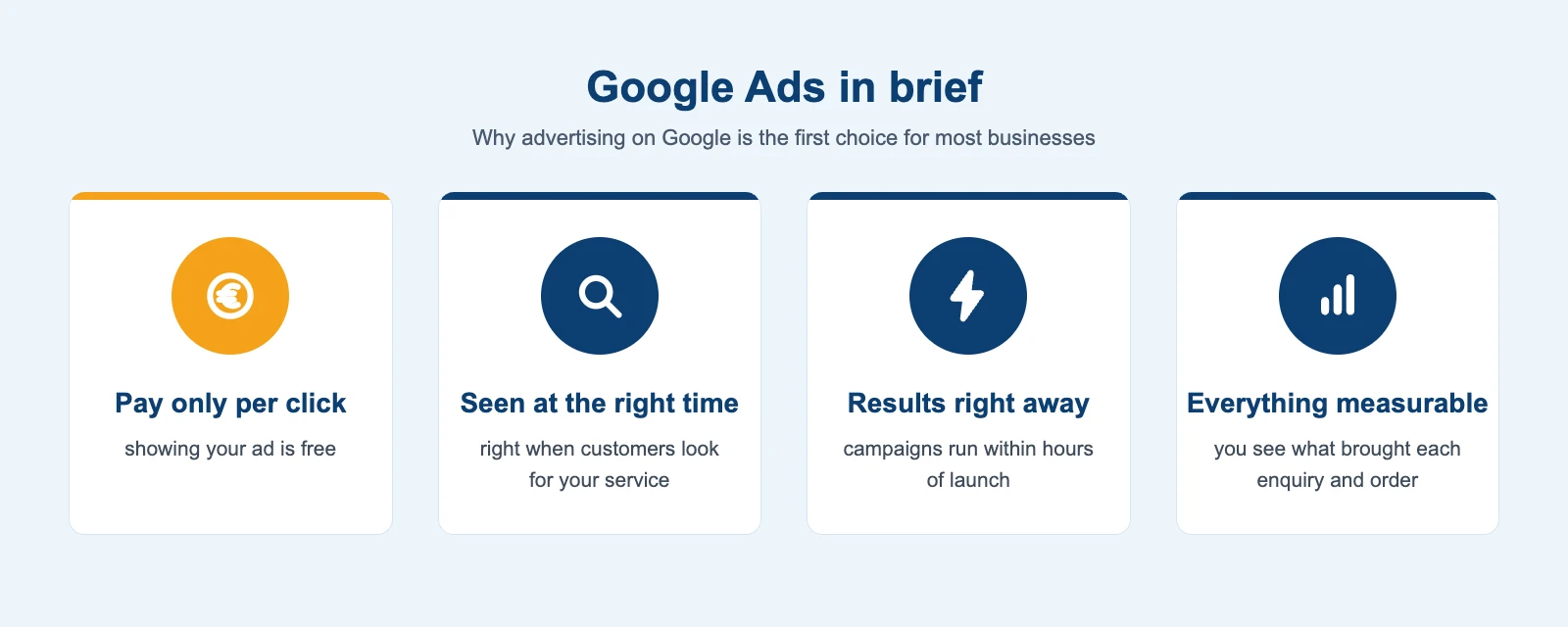
In the example you can see paid ads that appear at the very top of the search results. These ads look very similar to the organic results, except for the clear “Sponsored” label.
Where paid ads appear in search
Google Ads ads appear in search results above and below the organic results. The number of ad slots changes dynamically, so focus on metrics such as impression share, top and absolute top impression rate, CTR and conversions. They describe ad performance better than the old average position.
CTR is the ratio between clicks and impressions of an ad. So after launch, do not click on your own ads unnecessarily, as this can lower your CTR significantly. Click-through rate is a key metric for ad success, so it is worth monitoring and improving.
How does Google Ads work?
Google Ads works on the pay per click (PPC) principle. Businesses choose specific keywords on Google and bid on them. They compete with other businesses bidding on the same keywords, such as “insurance” in the example above.
Your bids are “maximum bids”, i.e. the highest amount you are willing to pay for a click on your ad.
For example, if your maximum bid is €4 and Google determines a cost per click of €2, your ad gets a place. If Google’s cost per click is above €4, your ad will not be shown.
Budget limits
For every Google Ads campaign you set an average daily budget . This way you never spend more than planned and can better estimate how much to budget for online advertising in the future.
For most campaigns you never pay more than your average daily budget:
- The daily spending limit is the maximum amount you can be charged in a campaign for one day.
- The monthly spending limit is the maximum amount you pay for a campaign in one month. It equals the average daily budget multiplied by 30.4 (365 days divided by 12 months). If the campaign starts mid-month, only the days it runs count.
Can the costs shown exceed these limits? In some cases yes, but you do not need to worry. You never pay more than your limits allow. The key is the difference between the costs shown and the costs billed.
- The costs shown are the sum of all clicks or impressions in the campaign.
- The costs billed are the amount actually due after corrections, for example for invalid clicks.
The costs shown can exceed the limits, but the costs billed never do. If that does happen, Google covers the difference.
Quality Score
Advertisers on Google can choose from three billing models:
- Cost-per-click (CPC) : what you pay when a user clicks on your ad.
- Cost-per-mille (CPM): what you pay for 1,000 impressions.
- Cost-per-engagement (CPE): what you pay when a user takes a specific action with your ad, for example signing up for a newsletter or watching a video.
Google then combines your bid with an assessment of your ad, the Quality Score.
Quality Score is based on expected click-through rate, ad relevance and the landing page experience (load time, content, UX).
Quality Score ranges from 1 to 10, where 10 is the best value. The higher your score, the better your ad is rated and the less you pay per conversion.
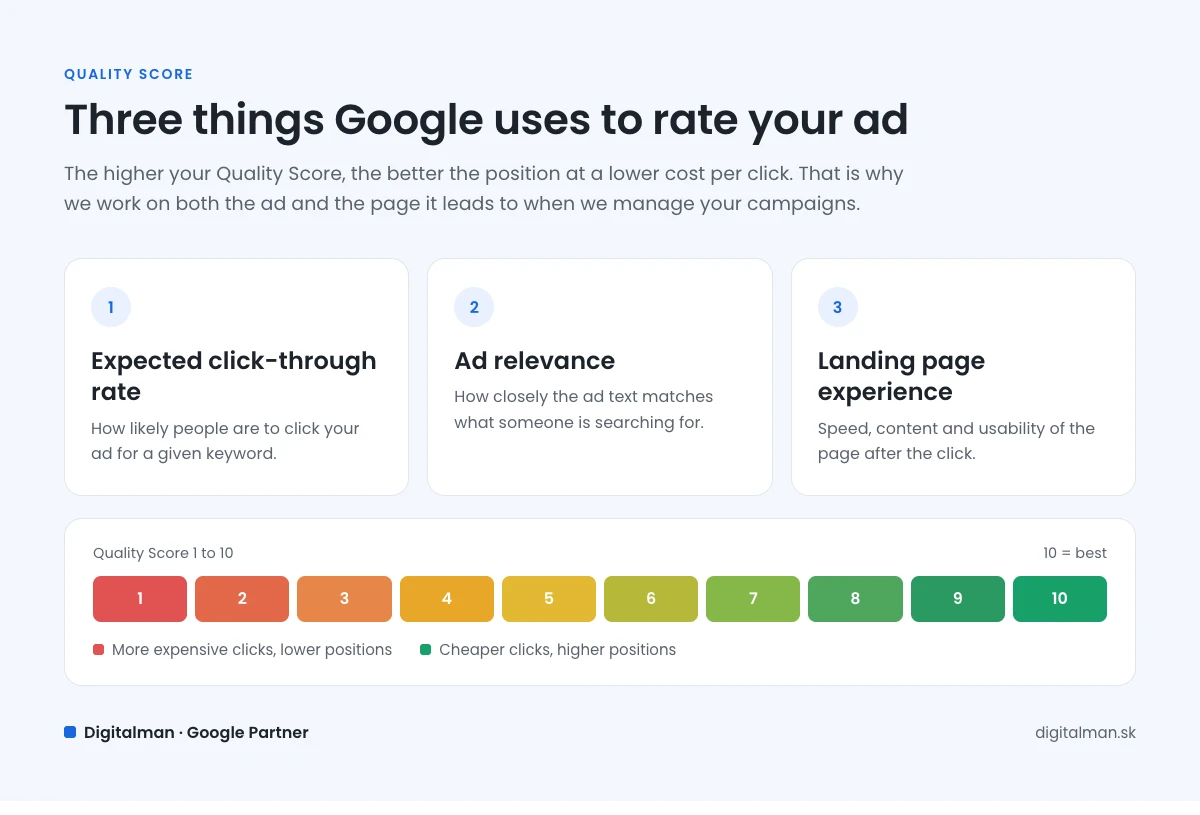
Quality Score and bid together determine Ad Rank, i.e. the position at which your ad appears in search results. When a user clicks on your ad, you pay for that click (PPC, pay per click).
The goal is for as many relevant users as possible to click on your ad, so your advertising goals are met, such as new leads or purchases.
The Google Ads auction
There are many advertisers but only limited space for ads. That is why every search on Google runs an auction. However, the highest bid alone does not decide the result.
The position and number of ads shown depend on two main factors:
- Maximum bid = the most you are willing to pay for a click on your ad.
- Quality Score = Google’s assessment of the quality of your ad.

That is why there is no single price list for Google advertising. Costs are variable and depend on your settings and campaigns.
Example of calculating Ad Rank in Google Ads
Now that you know how Google Ads works, let us look at the different campaign types.
Campaign types in Google Ads
Google offers many different campaign types:
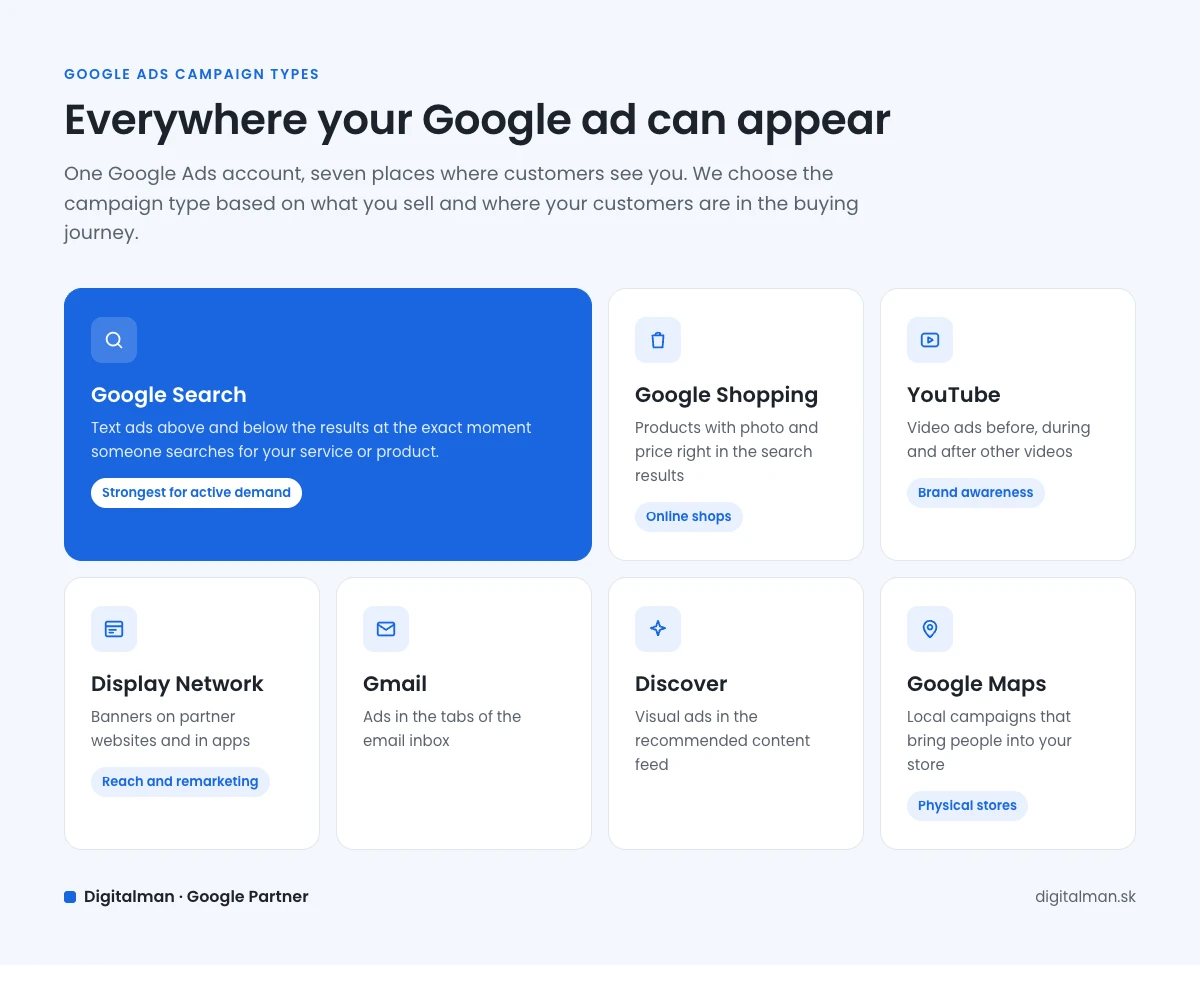
1. Search campaigns (Google Search)
Search ads appear as text ads on the search results page for specific keywords. Their success therefore depends heavily on choosing the right keywords.
This is what a search ad looks like and what it consists of:

Today search uses responsive search ads (RSA). You can add up to 15 headlines (each up to 30 characters) and 4 descriptions (each up to 90 characters), which Google combines dynamically. It is important to test variants and pin the most important texts.

2. Shopping campaigns (Google Shopping Ads)
Text ads are not the only ad format in search. With Shopping campaigns you promote your products more visually, as Google shows a list of relevant products . The products link directly to online shops, which makes buying easier and increases the likelihood of conversion.
These ads appear as products with a photo, price and shop name right in the search results:

The ads can also appear in Google Shopping:
Google Shopping is ideal if you advertise physical products. This ad format helps you win qualified prospects , because it shows your product directly and takes customers to your online shop in one click.
3. Display campaigns (Google Ads Display)
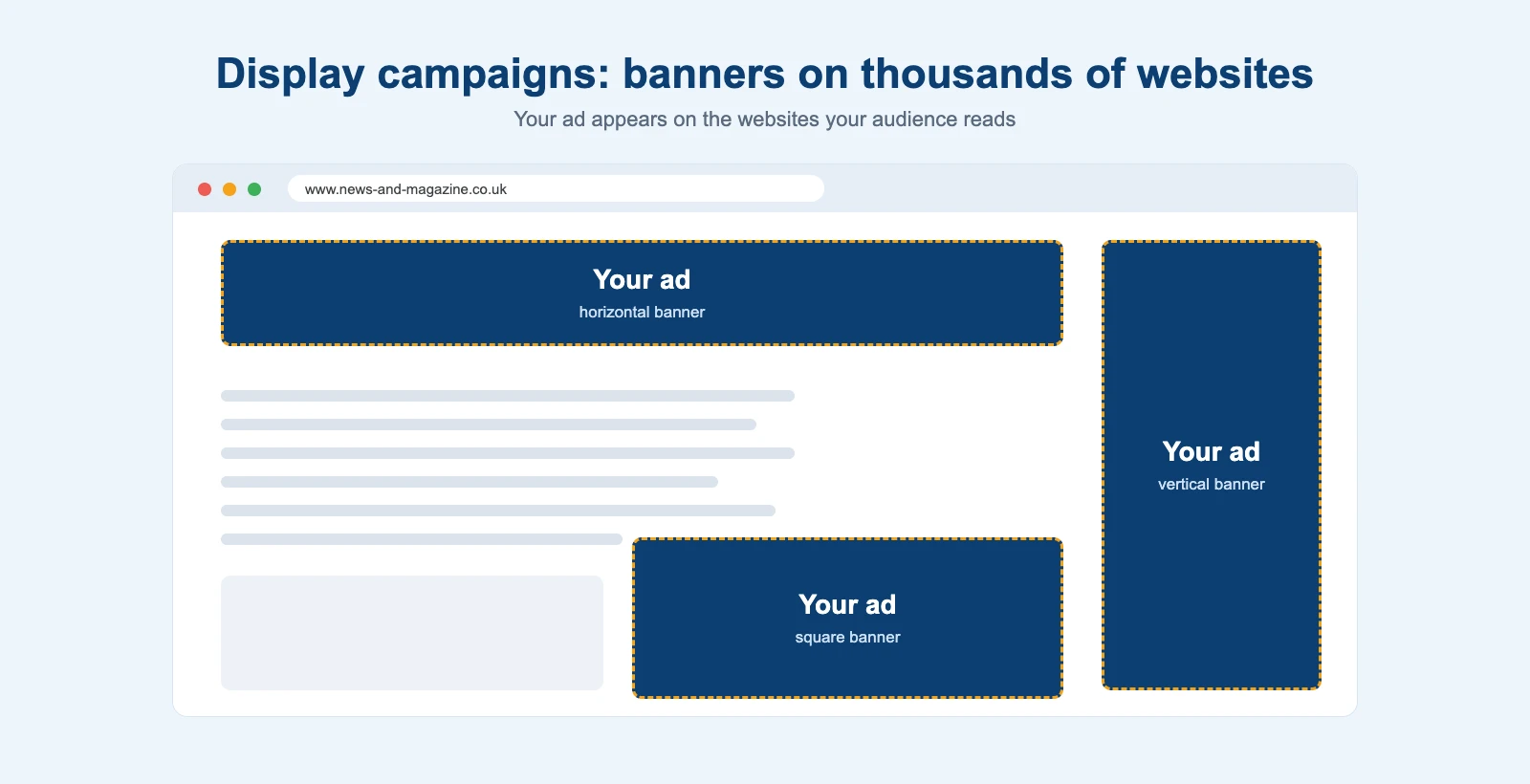
Display campaigns use Google’s partners to show your ads on many websites. The ads come in different formats and are usually set up as responsive ads.
Closely related is another Google service, Google AdSense. With Google AdSense, website owners earn money by showing ads from Google Ads. Based on the content of the website and its visitors, AdSense selects relevant ads. These ads are created and paid for by advertisers in Google Ads. Prices vary by ad, which also affects the website owner’s earnings.
With AdSense you can show visitors to your website relevant and attractive ads that can be adapted to the design of your website. The format is chosen by the advertiser, for example video, image or GIF.
The ad appears on third party websites as banners in various formats:
You can also advertise in Gmail with Google:
4. Video campaigns (YouTube)
A video campaign in Google Ads can appear before or during a video, between Shorts and in YouTube search results:
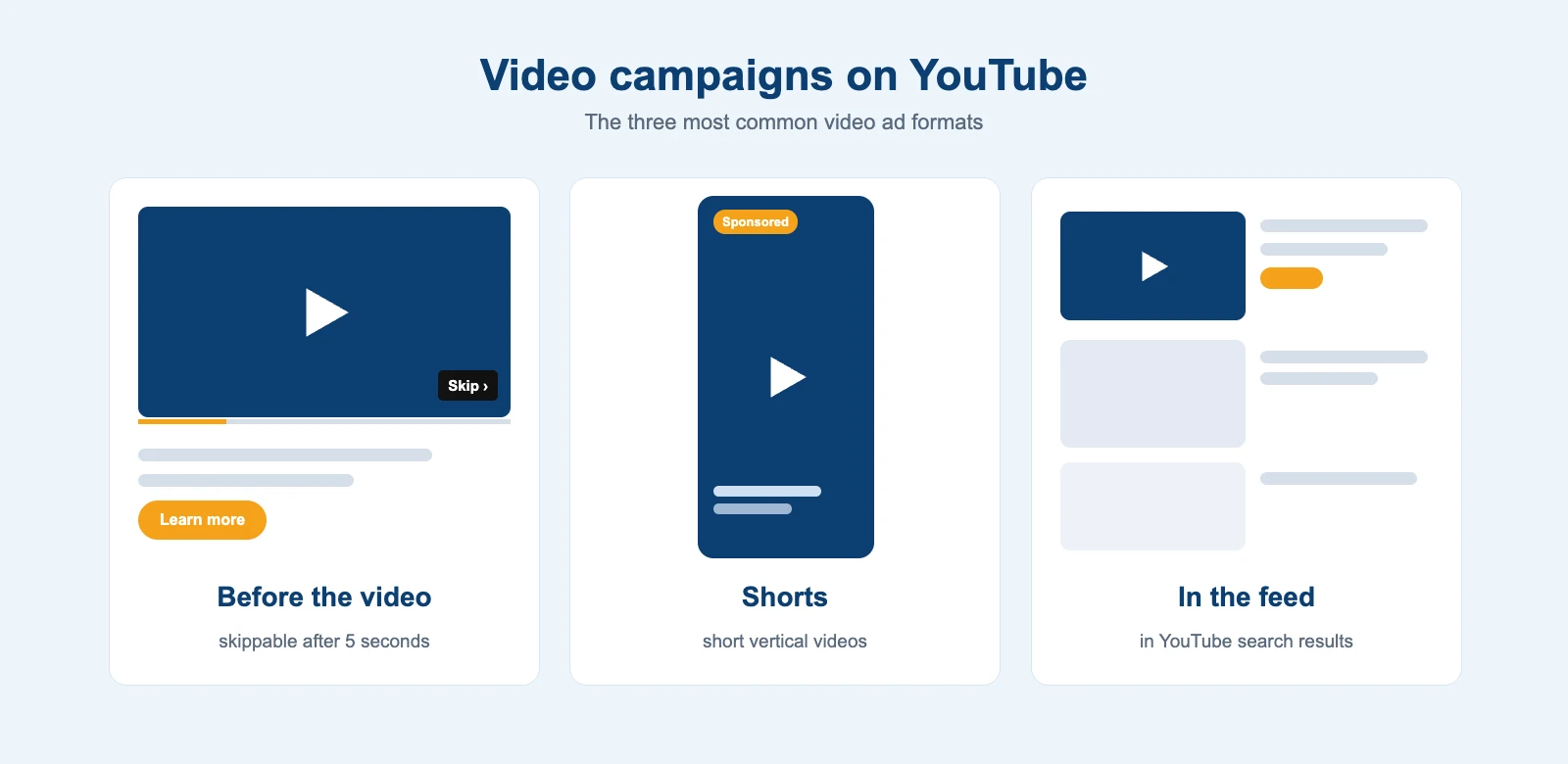
Ad formats on YouTube
- Non-skippable in-stream ad: a video ad of up to 15 seconds that cannot be skipped and plays before, during or after another video. Billed per 1,000 impressions (CPM).
- Skippable in-stream ad : an ad that can be skipped after 5 seconds. Billed per view of 30 seconds (or the whole video if shorter) or per 1,000 impressions (CPM).
- Video discovery ad: a text ad with a thumbnail that appears in YouTube search, on the home page, among recommended videos and on partner sites. Billed when a user clicks the thumbnail and watches the video.
- Bumper ad: a non-skippable 6 second video ad before or during another video. Billed per 1,000 impressions (CPM).
- Out-stream ad: a mobile-only video ad that appears on partner websites and in apps. Billed when at least 50% of the ad is visible for 2 seconds (CPM).
- Masthead ad: an ad at the very top of the YouTube home page on computers, mobile devices and TVs. Available only on a reservation basis through a Google sales representative.
Pros and cons of video ads in Google Ads
Video ads in Google Ads have pros and cons. The advantage: Google works with more than two million websites and reaches over 90% of all internet users. So your ad is shown to a wide audience.
The disadvantages cannot be avoided entirely. Your ads may appear on websites or before videos you do not want your brand associated with. On YouTube this became known as the “Adpocalypse”. In campaign settings you can exclude unwanted websites in advance and exclude more during the campaign once you see where the ads appeared.
If you manage placements carefully, display ads can be a very good way to win new prospects through other websites.
A video campaign can also appear on websites whose content matches its keywords, which increases the chance of reaching the right audience.
5. App campaigns
Like video campaigns, app campaigns use Google’s network and are suitable for targeted campaigns.
With this campaign type you do not have to design every ad individually. Google Ads takes your copy and assets such as photos and creates ads for your app from them.
The algorithm tests different combinations and uses the best performing ones most often. This makes your ad as effective as possible and suited to the audience.

6. Demand Gen campaigns
Demand Gen campaigns have replaced the former Discovery campaigns. They show visual ads with images and videos on YouTube including Shorts, in Discover, Gmail and Google Maps. They are suited to creating interest among people who are not searching for you yet, and for remarketing. In form they resemble social media ads.
7. Performance Max
Performance Max shows ads from a single campaign across all Google services: Search, YouTube, Gmail, Maps, Discover and the Display Network. Using machine learning, the system looks for conversions where they are cheapest. Google has also merged the former Smart Shopping and local campaigns into Performance Max.
It delivers the best results with reliable conversion tracking and for online shops with a good product feed.
Google Ads or SEO?
Both routes lead to the first page of Google, they differ in cost, speed and sustainability.
| Criterion | Google Ads | SEO |
|---|---|---|
| When do first results come | On launch day | Usually after 3 to 6 months |
| How you pay | Per click | For the work, not per visit |
| What happens after stopping | Traffic ends immediately | Rankings drop slowly, over months to years |
| Control over delivery | High, you decide search terms and budget | Indirect, the algorithm decides |
The most common Google Ads mistakes
- Keyword match types that are too broad. The ad appears for searches unrelated to the offer, and the budget goes into clicks with no chance of an order. The negative keyword list must be extended continuously, not just once at launch.
- Performance Max as the first campaign. The campaign spreads the budget across Search, the Display Network, YouTube and other placements. Without data and exclusions most of the budget ends up on the cheapest placements, and the result is hard to evaluate.
- No conversion tracking. The account does not measure forms, clicks on the phone number or orders. The algorithm then cannot tell which user is valuable and targets blindly.
- Distrust of the data and a frozen budget. This follows from the previous mistake. The client cannot see what the campaign brings, does not increase the budget and so misses enquiries that more budget would bring. The cycle only ends when the account measures real business results.
- The ad leads to the home page. The visitor searched for a specific service and has to find it on the website first. The landing page should match the search.
Related services: What cost per click depends on is explained on the page Google Ads cost. If you are also considering other paid channels, see the overview of PPC advertising, Facebook advertising and Microsoft Ads . We describe the new paid advertising in AI interfaces on the page ChatGPT Ads.
More enquiries and sales from Google?
In the free consultation we look at your account or website and show how Google advertising would work for your business.
The first 60 minutes free · online via Teams or Google Meet